
Latest Version
Version
5.5.5
5.5.5
Update
April 11, 2026
April 11, 2026
Developer
iNetwork Tech
iNetwork Tech
Categories
Tools
Tools
Platforms
Android
Android
Downloads
3
3
License
Free
Free
Package Name
com.wifiset.wifiset
com.wifiset.wifiset
Report
Report a Problem
Report a Problem
More About WiFiSet - Wifi Network Scanner
WiFiSet is a powerful Wi-Fi analyzer and network scanner that helps you find connected devices, detect unknown activity, fix Wi-Fi issues, and use 25+ professional tools — with no ads, no tracking, and local processing.
Why is my Wi-Fi slow?
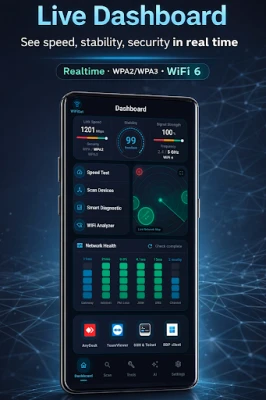
Use WiFiSet to analyze network quality with WiFi Analyzer and Smart Diagnose.
Who is using my Wi-Fi?
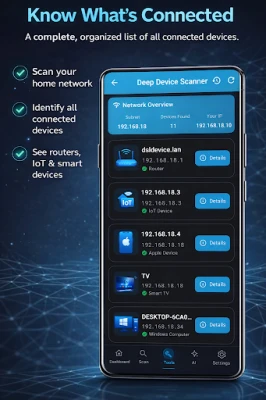
See connected devices and identify them with support for 42+ device types.
Need alerts for unknown devices?
Network Guard warns you when a new or unfamiliar device joins your network.
Want a cleaner experience?
WiFiSet is completely ad-free, with no tracking and no data collection.
🌐 12 LANGUAGES – FULLY TRANSLATED UI
WiFiSet is available in: English, Arabic (العربية), Spanish (Español), French (Français), German (Deutsch), Portuguese (Português), Turkish (Türkçe), Italian (Italiano), Russian (Русский), Japanese (日本語), Korean (한국어), and Chinese (中文). The entire interface is fully translated.
🔬 INTELLIGENT DEVICE SCANNER
Advanced device identification technology:
Confidence-based classification
Multi-protocol evidence analysis
Brand and vendor detection
Real-time device monitoring
Identifies: Routers, Smart TVs, IP Cameras, NAS, Printers, Game Consoles, IoT devices, Servers, VoIP systems, Smart Home devices, and 30+ more categories.
🧠 SMART DIAGNOSE
Next-generation network diagnostics with intelligent analysis:
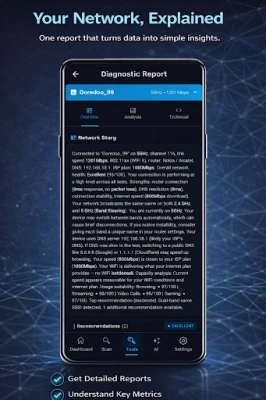
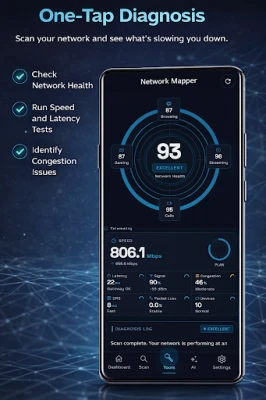
Smart Diagnose runs a multi-stage health check across your Wi-Fi and internet connection, then turns raw results into a clear explanation. It evaluates signal quality, latency, packet loss, DNS responsiveness, channel congestion, speed performance, and real-world usage impact such as browsing, streaming, calls, and gaming.
Includes root-cause analysis, impact assessment, and plain-language recommendations to help you understand what is limiting your network and how to improve it.
🛡️ NETWORK GUARD
Real-time network monitoring & alerts:
Automatic new device alerts
Known device tracking
Scheduled background scanning
Missing device notifications
📡 WIFI SMART ADVISOR
Intelligent wireless optimization:
Channel congestion analysis
Interference detection
WiFi 6/6E/7 support (device/OS dependent)
Actionable recommendations
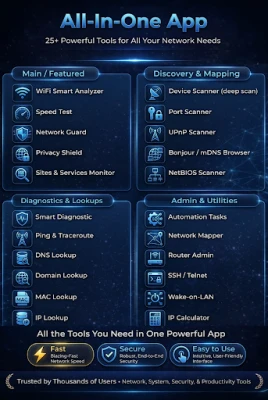
🧰 25+ PROFESSIONAL TOOLS
Scanners
Port Scanner | UPnP Discovery | Bonjour Browser | NetBIOS Scanner | SNMP Browser
Diagnostics
Speed Test (M-Lab) | Ping | Traceroute | DNS Lookup
Utilities
IP Calculator | MAC Lookup | IP Geo-location | Domain Lookup | Wake-on-LAN | SSH/Telnet Client | Router Default Credentials Reference | Local Wi-Fi Password Vault | Router Admin Guide | Automation Tasks
Visualization
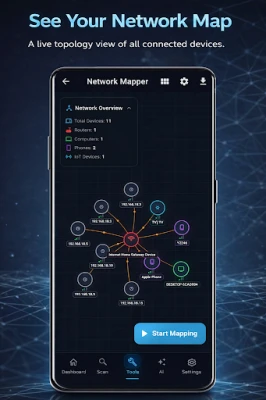
Network Mapper | 3D Topology View
⚡ KEY CAPABILITIES
Confidence-based device classification
Real-time 3D network visualization
OUI vendor database integration
Background monitoring service
SSH/Telnet remote access
🔒 PRIVACY FIRST
100% local processing
No data transmission
No personal data collection
📋 PERMISSIONS
• Location — Required by Android for Wi-Fi scanning results
• Nearby devices — Used to discover devices on your local network
• Bluetooth Scan — Used to scan for Bluetooth Low Energy (BLE) devices such as AirTags, SmartTags, and Tile trackers to detect hidden tracking devices (Privacy Shield feature)
• Bluetooth Connect — Required on Android 12+ to access BLE device information, even in read-only mode (Privacy Shield feature)
• Camera — Used for infrared (IR) camera detection to identify IR LED lights in hidden cameras (Privacy Shield feature)
All permissions are used locally only. No data is transmitted outside your device.
Built for power users, IT professionals, network administrators, and anyone who wants deeper insight into their Wi-Fi network.
⚠️ For legitimate network analysis only. Users must comply with local regulations.
Use WiFiSet to analyze network quality with WiFi Analyzer and Smart Diagnose.
Who is using my Wi-Fi?
See connected devices and identify them with support for 42+ device types.
Need alerts for unknown devices?
Network Guard warns you when a new or unfamiliar device joins your network.
Want a cleaner experience?
WiFiSet is completely ad-free, with no tracking and no data collection.
🌐 12 LANGUAGES – FULLY TRANSLATED UI
WiFiSet is available in: English, Arabic (العربية), Spanish (Español), French (Français), German (Deutsch), Portuguese (Português), Turkish (Türkçe), Italian (Italiano), Russian (Русский), Japanese (日本語), Korean (한국어), and Chinese (中文). The entire interface is fully translated.
🔬 INTELLIGENT DEVICE SCANNER
Advanced device identification technology:
Confidence-based classification
Multi-protocol evidence analysis
Brand and vendor detection
Real-time device monitoring
Identifies: Routers, Smart TVs, IP Cameras, NAS, Printers, Game Consoles, IoT devices, Servers, VoIP systems, Smart Home devices, and 30+ more categories.
🧠 SMART DIAGNOSE
Next-generation network diagnostics with intelligent analysis:
Smart Diagnose runs a multi-stage health check across your Wi-Fi and internet connection, then turns raw results into a clear explanation. It evaluates signal quality, latency, packet loss, DNS responsiveness, channel congestion, speed performance, and real-world usage impact such as browsing, streaming, calls, and gaming.
Includes root-cause analysis, impact assessment, and plain-language recommendations to help you understand what is limiting your network and how to improve it.
🛡️ NETWORK GUARD
Real-time network monitoring & alerts:
Automatic new device alerts
Known device tracking
Scheduled background scanning
Missing device notifications
📡 WIFI SMART ADVISOR
Intelligent wireless optimization:
Channel congestion analysis
Interference detection
WiFi 6/6E/7 support (device/OS dependent)
Actionable recommendations
🧰 25+ PROFESSIONAL TOOLS
Scanners
Port Scanner | UPnP Discovery | Bonjour Browser | NetBIOS Scanner | SNMP Browser
Diagnostics
Speed Test (M-Lab) | Ping | Traceroute | DNS Lookup
Utilities
IP Calculator | MAC Lookup | IP Geo-location | Domain Lookup | Wake-on-LAN | SSH/Telnet Client | Router Default Credentials Reference | Local Wi-Fi Password Vault | Router Admin Guide | Automation Tasks
Visualization
Network Mapper | 3D Topology View
⚡ KEY CAPABILITIES
Confidence-based device classification
Real-time 3D network visualization
OUI vendor database integration
Background monitoring service
SSH/Telnet remote access
🔒 PRIVACY FIRST
100% local processing
No data transmission
No personal data collection
📋 PERMISSIONS
• Location — Required by Android for Wi-Fi scanning results
• Nearby devices — Used to discover devices on your local network
• Bluetooth Scan — Used to scan for Bluetooth Low Energy (BLE) devices such as AirTags, SmartTags, and Tile trackers to detect hidden tracking devices (Privacy Shield feature)
• Bluetooth Connect — Required on Android 12+ to access BLE device information, even in read-only mode (Privacy Shield feature)
• Camera — Used for infrared (IR) camera detection to identify IR LED lights in hidden cameras (Privacy Shield feature)
All permissions are used locally only. No data is transmitted outside your device.
Built for power users, IT professionals, network administrators, and anyone who wants deeper insight into their Wi-Fi network.
⚠️ For legitimate network analysis only. Users must comply with local regulations.
Rate the App
Add Comment & Review
User Reviews
Based on 0 reviews
No reviews added yet.
Comments will not be approved to be posted if they are SPAM, abusive, off-topic, use profanity, contain a personal attack, or promote hate of any kind.










More »

Popular Apps

Stars Messenger Kids Safe ChatConnect Works

Gaijin PassGaijin Distribution KFT

Love Island: The GameFusebox Games

WhatsApp MessengerWhatsApp LLC

VPN Vault - Super Proxy VPNAppsverse, Inc.

Tik VPNTik VPN Studio

Telegram XTelegram FZ-LLC

My Disney ExperienceDisney

GmailGoogle LLC

ContactsGoogle LLC
More »
Editor's Choice
My Disney ExperienceDisney
Telegram XTelegram FZ-LLC

Microsoft Edge CanaryMicrosoft Corporation
Tik VPNTik VPN Studio

HideMe - Smart Safe InternetIronMeta Studio

WhatsApp MessengerWhatsApp LLC
WhatsApp MessengerWhatsApp LLC

Grim Soul: Dark Survival RPGBrickworks Games Ltd

Craft of Survival - Gladiators101XP LIMITED

Last Shelter: SurvivalLong Tech Network Limited