
Latest Version
Version
4.5.3
4.5.3
Update
July 11, 2026
July 11, 2026
Developer
Ahmet Can Arslan
Ahmet Can Arslan
Categories
Tools
Tools
Platforms
Android
Android
Downloads
5
5
License
$4.49
$4.49
Package Name
com.arslan.shizuwall
com.arslan.shizuwall
Report
Report a Problem
Report a Problem
More About ShizuWall No Root/VPN Firewall
ShizuWall – No-Root, No-VPN Android Firewall
Take full control of your privacy!
ShizuWall is a lightweight, privacy-first firewall that lets you block internet access for any app without rooting your device or using a battery-draining VPN service. Powered by Shizuku (or built-in local ADB), it works seamlessly on Android 11 and above — giving you true system-level control with almost zero overhead.
Why Choose ShizuWall?
No root required — Works on stock, non-rooted devices
No VPN tunnel — No speed loss, no extra battery drain, no connection drops
Real per-app blocking — Uses Android's native connectivity framework (Chain-3 style) to completely cut off network access — no packet capturing or redirection
Privacy-first & fully local — Zero data leaves your device, no analytics, no tracking, no telemetry
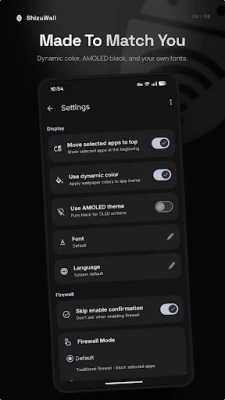
Super lightweight — Clean Material You design, minimal resource usage, fast & responsive
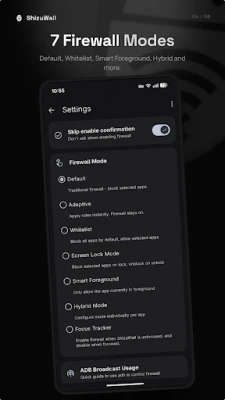
Advanced modes (v4.2+)
Whitelist mode: Only allowed apps can connect
Foreground-only mode: Block background data while allowing foreground use
Automation ready — Easily integrate with Tasker, MacroDroid or ADB broadcasts for auto-rules on boot/Wi-Fi change
Open source — Full code on GitHub under GPLv3 — transparent and community-driven
Perfect For:
Blocking ads, trackers & background data hogs (Facebook, TikTok, Google apps, etc.)
Saving mobile data & battery life by restricting unnecessary apps
Creating a focused / distraction-free mode (block social media & games)
Enhancing privacy & security without compromises
Parental control — isolate apps for kids
Stopping sneaky background uploads/downloads
Super Easy Setup (Takes ~1 Minute)
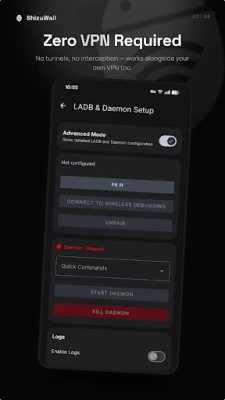
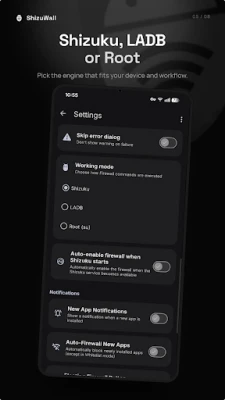
Install Shizuku from Play Store (or use our built-in local ADB mode)
Start Shizuku via wireless debugging (no PC needed)
Open ShizuWall → Grant permission → Tap to block/allow any app!
Quick tip: Rules reset on reboot due to Android security — enable Shizuku auto-start or use Tasker for one-tap restoration.
ShizuWall is a lightweight, privacy-first firewall that lets you block internet access for any app without rooting your device or using a battery-draining VPN service. Powered by Shizuku (or built-in local ADB), it works seamlessly on Android 11 and above — giving you true system-level control with almost zero overhead.
Why Choose ShizuWall?
No root required — Works on stock, non-rooted devices
No VPN tunnel — No speed loss, no extra battery drain, no connection drops
Real per-app blocking — Uses Android's native connectivity framework (Chain-3 style) to completely cut off network access — no packet capturing or redirection
Privacy-first & fully local — Zero data leaves your device, no analytics, no tracking, no telemetry
Super lightweight — Clean Material You design, minimal resource usage, fast & responsive
Advanced modes (v4.2+)
Whitelist mode: Only allowed apps can connect
Foreground-only mode: Block background data while allowing foreground use
Automation ready — Easily integrate with Tasker, MacroDroid or ADB broadcasts for auto-rules on boot/Wi-Fi change
Open source — Full code on GitHub under GPLv3 — transparent and community-driven
Perfect For:
Blocking ads, trackers & background data hogs (Facebook, TikTok, Google apps, etc.)
Saving mobile data & battery life by restricting unnecessary apps
Creating a focused / distraction-free mode (block social media & games)
Enhancing privacy & security without compromises
Parental control — isolate apps for kids
Stopping sneaky background uploads/downloads
Super Easy Setup (Takes ~1 Minute)
Install Shizuku from Play Store (or use our built-in local ADB mode)
Start Shizuku via wireless debugging (no PC needed)
Open ShizuWall → Grant permission → Tap to block/allow any app!
Quick tip: Rules reset on reboot due to Android security — enable Shizuku auto-start or use Tasker for one-tap restoration.
Rate the App
Add Comment & Review
User Reviews
Based on 0 reviews
No reviews added yet.
Comments will not be approved to be posted if they are SPAM, abusive, off-topic, use profanity, contain a personal attack, or promote hate of any kind.













More »

Popular Apps

Stars Messenger Kids Safe ChatConnect Works

Gaijin PassGaijin Distribution KFT

Love Island: The GameFusebox Games

WhatsApp MessengerWhatsApp LLC

VPN Vault - Super Proxy VPNAppsverse, Inc.

Tik VPNTik VPN Studio

Telegram XTelegram FZ-LLC

My Disney ExperienceDisney

GmailGoogle LLC

ContactsGoogle LLC
More »
Editor's Choice
My Disney ExperienceDisney
Telegram XTelegram FZ-LLC

Microsoft Edge CanaryMicrosoft Corporation
Tik VPNTik VPN Studio

HideMe - Smart Safe InternetIronMeta Studio

WhatsApp MessengerWhatsApp LLC
WhatsApp MessengerWhatsApp LLC

Grim Soul: Dark Survival RPGBrickworks Games Ltd

Craft of Survival - Gladiators101XP LIMITED

Last Shelter: SurvivalLong Tech Network Limited