


Latest Version
Version
1.2
1.2
Update
December 09, 2025
December 09, 2025
Developer
WEBGEHEUER OÜ
WEBGEHEUER OÜ
Categories
Entertainment
Entertainment
Platforms
Android
Android
Downloads
0
0
License
Free
Free
Package Name
com.decksettings.app
com.decksettings.app
Report
Report a Problem
Report a Problem
More About DeckSettings
DeckSettings helps Steam Deck players find reliable game settings, compatibility notes, and performance insights — all in one place, without needing to browse or search across multiple sites.
It brings together community favorite trusted sources to make discovering the right configuration faster and easier.
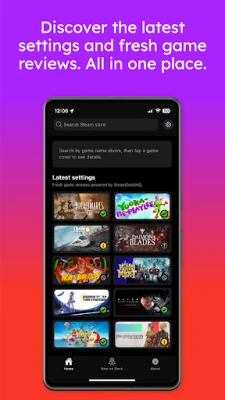
The Home screen is the fastest way to discover new tuning guides.
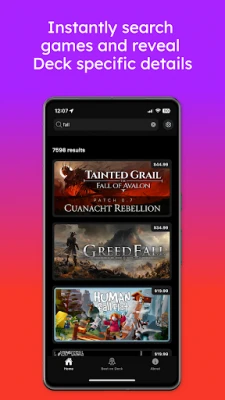
A Latest Settings feed highlights recent SteamDeckHQ, ShareDeck and DeckVerifiedGames reports, and the search bar lets you look up any game from the Steam Store.
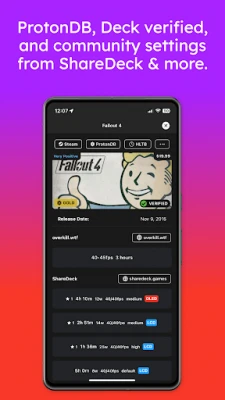
The Game Details view consolidates data from multiple sources, including ProtonDB, Deck Verified status and Steam reviews.
Quick-action buttons provide direct links to Steam, ProtonDB, and HowLongToBeat and more, while the Game Settings section collects presets from ShareDeck, SteamDeckHQ, DeckVerifiedGames and Overkill.wtf when available.
The Best on Deck tab showcases SteamDeckHQ’s top-rated titles with continuous scrolling for effortless browsing.
Each card opens into the same detailed view, making it simple to compare settings and choose what to play next.
Whether you’re fine-tuning performance, extending battery life, or researching new releases, DeckSettings keeps reliable knowledge within reach — optimized for the Steam Deck experience.
Disclaimer
DeckSettings is not affiliated with, endorsed by, or sponsored by Valve Corporation, Steam, or Steam Deck.
All trademarks, logos, and images related to Steam Deck are the property of Valve.
Game titles, images, and logos belong to their respective owners.
The Home screen is the fastest way to discover new tuning guides.
A Latest Settings feed highlights recent SteamDeckHQ, ShareDeck and DeckVerifiedGames reports, and the search bar lets you look up any game from the Steam Store.
The Game Details view consolidates data from multiple sources, including ProtonDB, Deck Verified status and Steam reviews.
Quick-action buttons provide direct links to Steam, ProtonDB, and HowLongToBeat and more, while the Game Settings section collects presets from ShareDeck, SteamDeckHQ, DeckVerifiedGames and Overkill.wtf when available.
The Best on Deck tab showcases SteamDeckHQ’s top-rated titles with continuous scrolling for effortless browsing.
Each card opens into the same detailed view, making it simple to compare settings and choose what to play next.
Whether you’re fine-tuning performance, extending battery life, or researching new releases, DeckSettings keeps reliable knowledge within reach — optimized for the Steam Deck experience.
Disclaimer
DeckSettings is not affiliated with, endorsed by, or sponsored by Valve Corporation, Steam, or Steam Deck.
All trademarks, logos, and images related to Steam Deck are the property of Valve.
Game titles, images, and logos belong to their respective owners.
Rate the App
Add Comment & Review
User Reviews
Based on 0 reviews
No reviews added yet.
Comments will not be approved to be posted if they are SPAM, abusive, off-topic, use profanity, contain a personal attack, or promote hate of any kind.















More »

Popular Apps

Stars Messenger Kids Safe ChatConnect Works

Gaijin PassGaijin Distribution KFT

Love Island: The GameFusebox Games

WhatsApp MessengerWhatsApp LLC

VPN Vault - Super Proxy VPNAppsverse, Inc.

Tik VPNTik VPN Studio

Telegram XTelegram FZ-LLC

My Disney ExperienceDisney

GmailGoogle LLC

ContactsGoogle LLC
More »
Editor's Choice
My Disney ExperienceDisney
Telegram XTelegram FZ-LLC

Microsoft Edge CanaryMicrosoft Corporation
Tik VPNTik VPN Studio

HideMe - Smart Safe InternetIronMeta Studio

WhatsApp MessengerWhatsApp LLC
WhatsApp MessengerWhatsApp LLC

Grim Soul: Dark Survival RPGBrickworks Games Ltd

Craft of Survival - Gladiators101XP LIMITED

Last Shelter: SurvivalLong Tech Network Limited