

Latest Version
Update
September 25, 2026
September 25, 2026
Developer
TLM Software Design, Inc.
TLM Software Design, Inc.
Categories
Tools
Tools
Platforms
Android
Android
Downloads
0
0
License
Free
Free
Package Name
com.swtlm.aiwalletpass
com.swtlm.aiwalletpass
Report
Report a Problem
Report a Problem
More About AI Wallet Pass
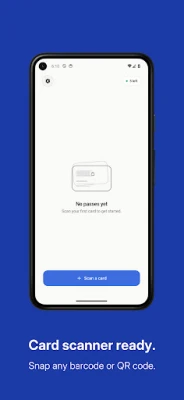
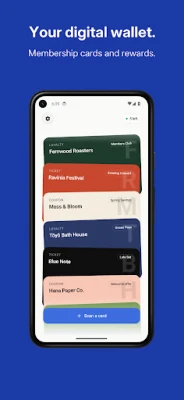
Turn the loyalty cards, event tickets, and coupons in your pocket into digital passes you can add to Google Wallet and use right from your phone — no manual data entry, no template juggling.
Point your camera at a card. AI Wallet Pass extracts the merchant, the program details, the barcode, and the visual style automatically, then hands you a ready-to-add pass you can review before it lands in your wallet. Most cards take under thirty seconds from shutter to scannable.
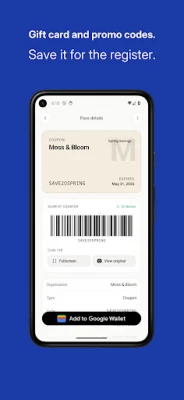
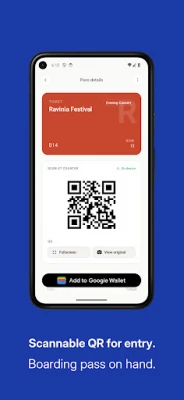
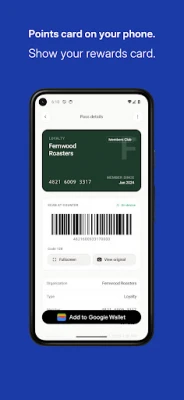
Built for the cards you actually carry: coffee shop punch cards, gym memberships, museum passes, concert tickets, transit cards, paper coupons, that one card from the regional grocery chain you keep losing.
Add to Google Wallet
Tap the official Add to Google Wallet button and your pass lands next to your payment cards and boarding passes — ready to scan at the register. Cards we can't embed in Google Wallet still live in the app, so nothing gets left behind.
Privacy first
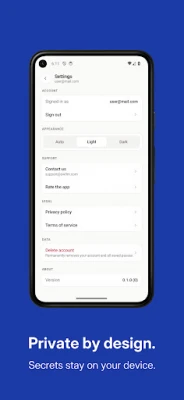
Your barcode is decoded on your device with on-device ML Kit and redacted from the photo, so only the redacted photo is sent for AI extraction. The barcode payload lives in the same storage your password manager uses and is rendered locally inside the app. The one time it goes over the network is when you add the pass to Google Wallet: it's sent to our signing endpoint, used in memory to build the signed pass, then discarded — never stored, never logged.
What you get
• AI extraction of card name, program type, colors, and fields
• On-device barcode and QR decoding before anything is uploaded
• One-tap Add to Google Wallet, with the cards we can't embed kept in the app
• In-app wallet — your passes available offline, instantly
• Light and dark theme with an Auto, Light, or Dark switch
• Sign in with Google or email — pick what you already use
• Three free passes a month. No subscription, no recurring charges.
Made for the cards that don't have an app of their own.
Built for the cards you actually carry: coffee shop punch cards, gym memberships, museum passes, concert tickets, transit cards, paper coupons, that one card from the regional grocery chain you keep losing.
Add to Google Wallet
Tap the official Add to Google Wallet button and your pass lands next to your payment cards and boarding passes — ready to scan at the register. Cards we can't embed in Google Wallet still live in the app, so nothing gets left behind.
Privacy first
Your barcode is decoded on your device with on-device ML Kit and redacted from the photo, so only the redacted photo is sent for AI extraction. The barcode payload lives in the same storage your password manager uses and is rendered locally inside the app. The one time it goes over the network is when you add the pass to Google Wallet: it's sent to our signing endpoint, used in memory to build the signed pass, then discarded — never stored, never logged.
What you get
• AI extraction of card name, program type, colors, and fields
• On-device barcode and QR decoding before anything is uploaded
• One-tap Add to Google Wallet, with the cards we can't embed kept in the app
• In-app wallet — your passes available offline, instantly
• Light and dark theme with an Auto, Light, or Dark switch
• Sign in with Google or email — pick what you already use
• Three free passes a month. No subscription, no recurring charges.
Made for the cards that don't have an app of their own.
Rate the App
Add Comment & Review
User Reviews
Based on 0 reviews
No reviews added yet.
Comments will not be approved to be posted if they are SPAM, abusive, off-topic, use profanity, contain a personal attack, or promote hate of any kind.














More »

Popular Apps

Stars Messenger Kids Safe ChatConnect Works

Gaijin PassGaijin Distribution KFT

Love Island: The GameFusebox Games

WhatsApp MessengerWhatsApp LLC

VPN Vault - Super Proxy VPNAppsverse, Inc.
Tik VPNTik VPN Studio

Telegram XTelegram FZ-LLC

My Disney ExperienceDisney
GmailGoogle LLC

ContactsGoogle LLC
More »
Editor's Choice
My Disney ExperienceDisney
Telegram XTelegram FZ-LLC

Microsoft Edge CanaryMicrosoft Corporation
Tik VPNTik VPN Studio

HideMe - Smart Safe InternetIronMeta Studio

WhatsApp MessengerWhatsApp LLC
WhatsApp MessengerWhatsApp LLC

Grim Soul: Dark Survival RPGBrickworks Games Ltd

Craft of Survival - Gladiators101XP LIMITED

Last Shelter: SurvivalLong Tech Network Limited